Email Marketing

The six steps of email personalisation

Do you seek the holy grail of email personalisation? Or as it’s known by its other name: one‑to‑one content.

As technologies have become more sophisticated, so too have customer expectations. But to reach the point of true personalisation is a journey with several steps.

1. Say my name

Let’s start with the bargain basement of personalisation. Greeting your customer by name in a subject line has been measured to increase open rates by more than 25%.

Just don’t mess that name up. "Hi, Adrian" is good. But "Hi, ADRIAN", "Hi, adrian", or "Hi, Young" looks bad. Yes, it would be me the customer who had made a mistake with your form in the first place. But the onus falls upon you to validate and fix your data.

2. Preferential treatment

At The Email Factory, we swear by preference centres. What better way to embark on an email journey with a new subscriber than by letting them pick and choose what to receive?

A preference centre gives your customer the choice of content or product types. But why stop there? Grant your customer further control over their inbox by including frequency and timing options.

3. Divide and convert

Whether your mailing list weighs in at a few hundred or a few hundred thousand, it is comprised of individuals. Not everyone is interested in the same content. So why send everyone the same email?

Segmentation is an essential part of email marketing. Divide up your lists into categories and keep your subscribers engaged with relevant content.

4. On your best behaviour

Personalisation isn’t all about what your customer likes but also what they are doing. And none of your customers are doing exactly the same thing at the same time. There are those that have newly discovered your brand. Some have just treated themself to a shiny new product. Others haven’t engaged with you for a while. Your task is to communicate with each of them based on their current actions.

Behaviour‑based emails let you react automatically to your customer’s activity (or lack thereof). When someone signs up, a welcome series is launched. If your customer has recently purchased a product, that can trigger an invitation to review it. For those who haven’t interacted for a while, a re‑engagement programme can rekindle their interest.

5. Where in the world

Your customer’s location matters. Maybe there’s an in‑store event or other locally relevant content to share. You might even want to send automatically-tailored content based on the local weather. Those hooded jackets sound a lot more useful when it’s pouring outside.

Location doesn’t only determine what to send but also when to send. Send time optimisation ensures that your subscribers receive your emails at a time of day that is personally convenient.

6. Welcome to the machine

As humans, we can only do so much. Luckily that "much" includes the development of ever‑more‑sophisticated machine learning software. As email marketers, we can harness that technology and take personlisation to another level.

Product recommendations are the obvious showcase, for now. Why guess at what your customer might like to buy when you can learn patterns from their previous purchasing and browsing activities?

While the current capablities of generative AI have been over‑hyped, its future potential is hard to grasp. Every aspect of your email, from copy to imagery to layout to timing to colouring, could all be generated on an individual basis.

True email personalisation

Your customer is a human and an individual. But they are likely one of many thousands. To talk to them one‑to-one ironically requires a fundamentally impersonal means of machine‑based automation. The concept of chummy person‑to‑person communication is an illusion.

But what really matters is relevance. Present your subscribers with the content that matters to them and the results will speak for themselves.

Email Marketing

Preparing for the Impact of iOS 17: The Era of Link Tracking Protection

In the wake of the iOS 15 update, marketers and agencies like The Email Factory faced a stern test of their resilience and adaptability, navigating through the challenges with creativity and determination. As we embraced the shifting landscape and focused on personalised engagement, we discovered new ways to thrive amidst the changes.

However, just as we thought the storm was successfully weathered, here we go again!

With the impending release of iOS 17, Apple is once again set to disrupt the email marketing world, this time with the introduction of link tracking protection. As we take time to analyse the potential impact, it’s time for us to gear up and prepare for yet another round of adjustments to our strategies and practices. So, let’s dive in and explore what lies ahead with iOS 17’s link tracking protection.

Apple’s continuous efforts to prioritise user privacy have led to the introduction of new features, and this time, link tracking protection takes center stage. As industry experts analyse the implications of this update, it becomes evident that email marketers must prepare for a shift in their strategies to navigate the evolving digital terrain.

iOS 17’s Link Tracking Protection:

The key feature of iOS 17 that is set to disrupt traditional email marketing practices is link tracking protection. This security measure aims to shield users from the intrusive tracking of their online activities via hyperlinks in emails. As a result, marketers will face challenges in tracking user engagement, and it’s crucial to understand the implications for future campaign planning.

Implications for Email Marketers:

While the link tracking protection in iOS 17 may pose challenges for email marketers, it’s important to remember that this is not the end of email tracking altogether. Most Email Service Providers (ESPs) use unique links for each and every link in an email, including the unsubscribe link. So, there are still ways to track user interactions to some extent.

However, email marketers should be prepared for potential limitations in data insights related to user behavior. Traditional link tracking methods, such as analysing click-through rates and conversion metrics, may become less effective or even obsolete. As a result, measuring the success of email campaigns could become more complex.

The impact on personalisation efforts should also be taken into account. Access to certain data necessary for creating tailored content may be limited due to link tracking protection. This may make it challenging to understand user preferences and deliver relevant messages, potentially leading to a decline in engagement and conversion rates.

Evolving Strategies and Collaboration:

To adapt to the changing landscape, email marketers will need to devise new strategies that focus on alternative metrics for assessing campaign performance. Traditional methods, like open rates and click-through rates, may no longer provide a complete picture. The emphasis may shift towards engagement-based metrics and user actions that do not rely on link tracking.

Collaboration with Email Service Providers will be vital as iOS 17 rolls out. Marketers should work closely with their ESPs to understand how this update impacts their tracking capabilities. Exploring alternative methods for analysing user interactions and collaborating on potential workarounds will be essential to continue delivering effective email campaigns.

Conclusion:

As iOS 17’s link tracking protection looms on the horizon, email marketers must prepare for a paradigm shift in their strategies. While some challenges may arise, there are still ways to track user interactions to some extent. Most ESP’s unique links and UTM parameters will still work in this iteration of iOS17 but it’s surely only a matter of time before an iOS works out how to stop those too. Staying agile, informed, and open to alternative metrics will help navigate the challenges posed by iOS 17 and continue to deliver impactful and relevant email campaigns. Ultimately, the successful adaptation to iOS 17’s link tracking protection will be a testament to the industry’s ability to evolve with changing technology and prioritise user privacy.

Email Marketing

Planning and implementing your email marketing strategy

Email marketing strategy

Just because you can do something doesn’t necessarily mean that you should! It’s an old adage and one many email marketers would do well to consider before embarking on their email marketing strategy.

If we start from what is possible the prospect of drawing up an email marketing strategy, budget, resource and timelines is daunting. I like to start from the other end, not what is possible but what does the business need. It sounds simple and the oft flippant response is more sales but that doesn’t always hold true. So start with a blank canvas and decide your business’s short, medium and long term goals. They may all turn out to be the same – sales, sales and more sales.

If that’s the case your email marketing strategy is a fairly simple one. Build product led emails and send them to everyone on your list as often as you can. Automate basket and browse abandonment, cross sell in sales notifications and dispatch notices. Sounds simple doesn’t it? But in truth this approach, even if your end goal is more sales, tends to be a short term solution. Data apathy, data churn, price marginalisation, stock management, all tend to make this approach, in isolation, one that’s unsustainable long term.

Email drives sales

So what to do, as in truth the ultimate goal of any marketing comes down to sales. We dress it up as brand awareness, customer retention, brand engagement, social media presence – but ultimately all marketing has one goal and that’s to drive long term revenues. So, if we accept that we need to plan our email marketing to fulfil long term revenue targets. This is done using a combination of sales and value-added content which engages the customer as well as sells to them. In essence you need to become the trusted source in the inbox. This has its challenges because marketers have an irrational fear of being seen as spammers. In his book, “Fear and Self-Loathing in Email Marketing”, Dela Quist says: “It is time, for legitimate email marketers – who bend over backwards not to be seen as spammers – to stop feeling so guilty about something they don’t even do”. It really is okay to send an email a day, or even two if you have something new and interesting to say.

In order to understand how best to use email we first need to look at how the long term goal is achieved.

List growth

New customer acquisition, grow the number of people you can realistically sell your products and services to. The more people on your list who look like the other people on your list the better.

Buildfires email list growth blog

List retention

This is like the silver bullet. Grow your list using customer acquisition tools and reduce the churn in your database. Increase the time someone stays a customer then the return on your initial CPA becomes exponential.

Automation

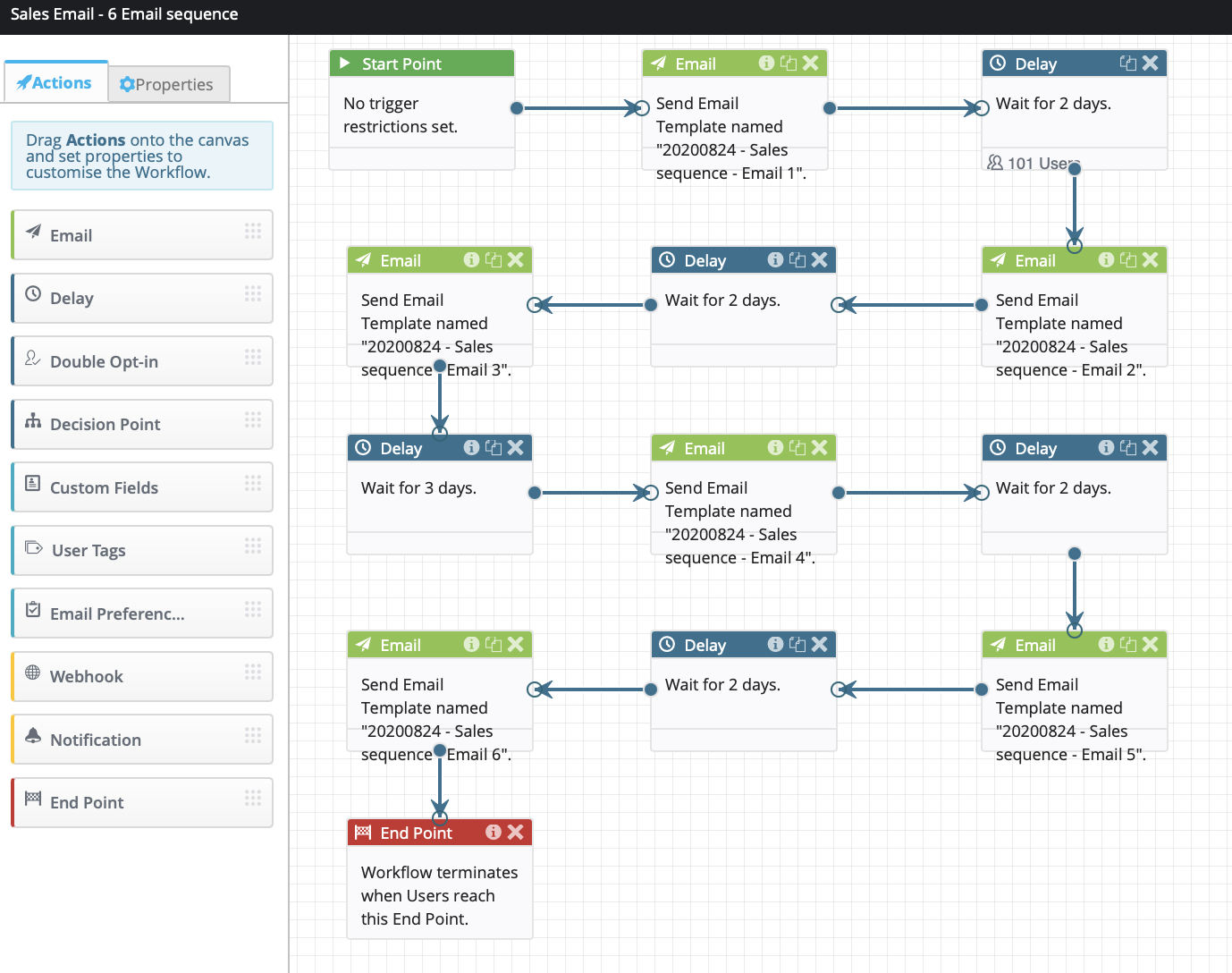
Automate touchpoints to deliver relevant and timely content. Keep your user engaged, recognise special life events and deliver new purchase user guides/vlogs/updates.

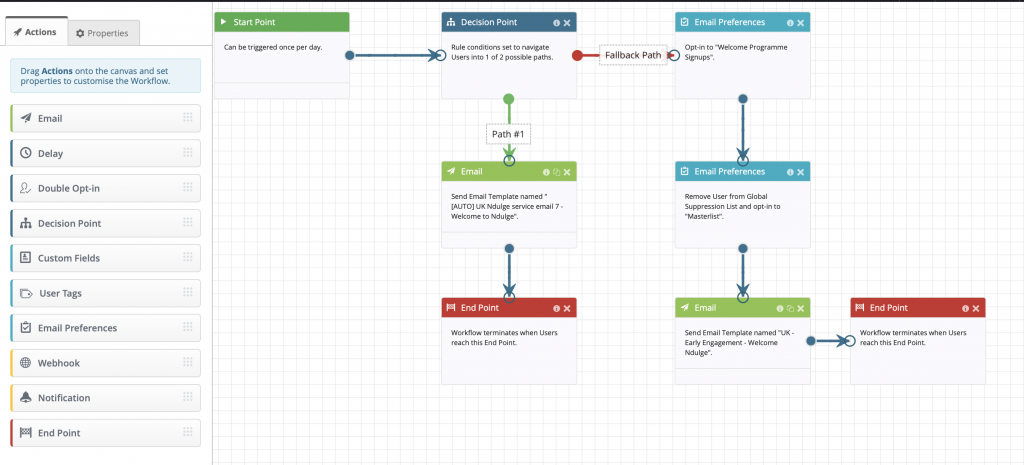
display block email automation workflow
Example email automation workflow

Loyalty and incentive programs

Make your user feel special, make them part of your inner circle.

Targeted communications

Segmentation in the data based on generic product offerings. Utilising the one-to-one marketing tools available to you to customise your one-to-many emails.

One too many sales emails

Don’t be frightened of emailing everyone in your base every time you have something to say. The idea of one-to-one marketing is in truth not achievable because you’re just not sure what I want next. It’s okay to assume I want something I looked at, just don’t assume I don’t want something else as well or instead.

Next, we will look at how we utilise the strategies outlined above to maximise our customer relationship and ultimately drive higher, long term revenues.

Let’s take a look at how you go about implementing some of the ideas mentioned. It’s time to flesh out the opportunities afforded by the medium of email marketing.

List growth

How do you go about growing your list? You can do this in many different ways, each one having their own level of effectiveness. The standard tools available are:

Newsletter sign-ups:

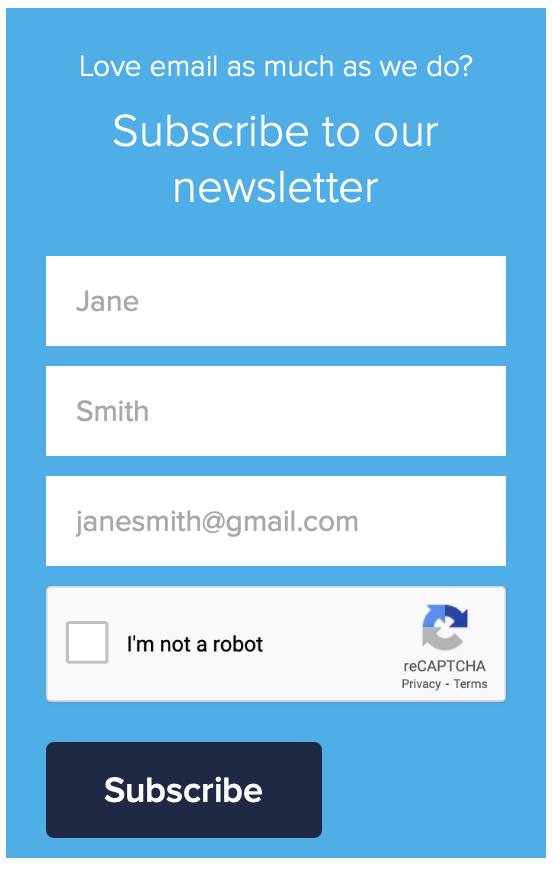
Have a clear and obvious way of letting people sign up for emails, hiding your newsletter sign up at the bottom of the contact page is almost apologetic. You’ve paid for the eyeballs, now try and capture them. Place the sign up somewhere obvious. Also, look at using downstream popups to incentivise sign up.

White paper downloads:

Put your valuable content behind a simple sign up to access a download page. In old fashioned sales you’re always taught to get a name for a name. No difference here, you have valuable content, the price of which is an email address.

Competitions:

Run competitions on your site, and in your existing email encourage people to sign up to be entered. If possible, give away experiential prizes rather than material ones. People are much more likely to enter a money can’t buy competition.

Referrals:

Incentivise your base to refer people like them to sign up for the newsletter or sales emails. Remember, people know people like them, if they enjoy your emails so will some of their friends.

display block email capture form
Example sign-up page

Point of purchase:

Be it on or offline, when someone makes a purchase it is the perfect time to ask permission to market to them via email. Make sure your staff do this routinely if on the phone or face to face in store. Make sure your site has a very obvious sign up tick box available when checking out. If at all possible also advertise text to email gateways in store and incentivise those.

Rented lists:

As long as you manage your expectations, renting lists can still be an effective way of building your database.

List retention

List retention for me is the silver bullet, if you can reduce your churn while at the same time growing your list you should be looking at exponential growth in revenues. Email on Acid believe in a “70/20/10” rule for brand emails. This means 70% of emails should be educational demos, tips, storytelling or advisory information. 20% should “centre on content from thought leaders, creating a feeling across your list that your brand is giving them exclusive access to content” and the remaining 10% should be product-focused. This rule is said to establish valuable relationships with your customers making them feel important, which they are! The more important they feel, the more engaged with the brand they will be.

Automation

Take some of the workload away and automate as many of your emails as possible. There are many tools available to help you collect site side data, send an API call to your email platform and subsequently trigger a timely email reminder. These types of communication tend to have the greatest open and click rates and the highest ROI.

The sort of things you can try are…

Welcome/acquisition:

Welcome programs work best when they come as a series of emails which lead the recipient down various paths of action dependent on whether they open and click a particular email or take a specific site side action.

display block workflow

Basket abandonment:

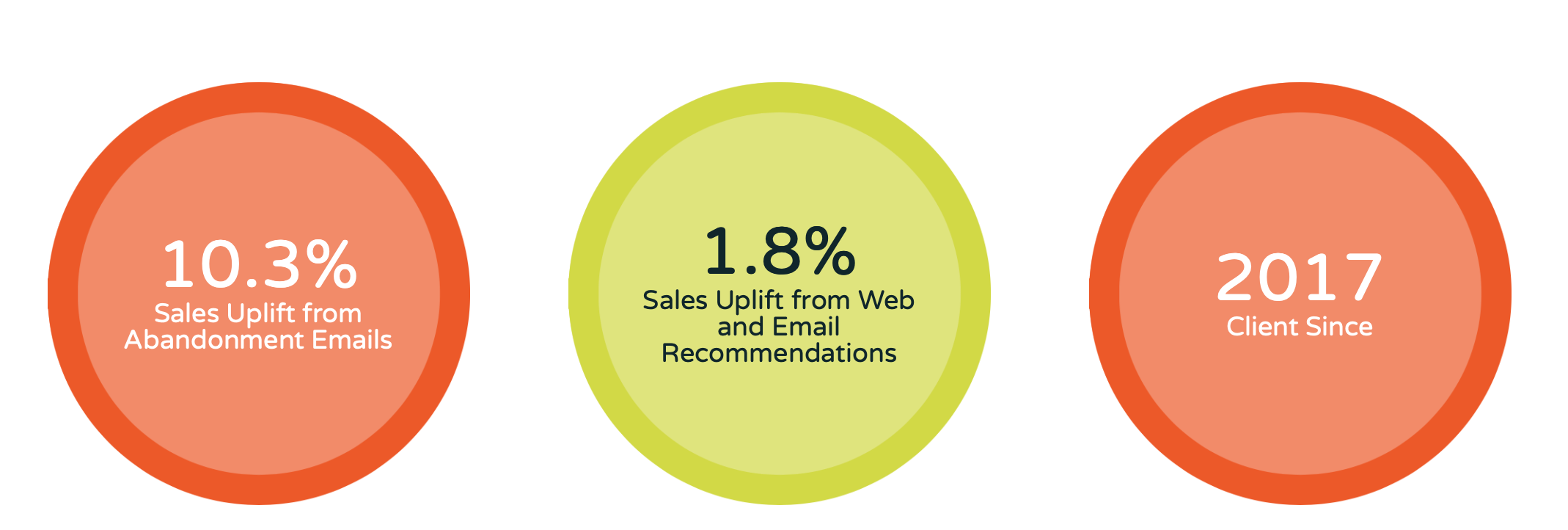
Someone has put a product in their basket on your site but not completed the purchase in a timely fashion. Post that data to your email automation tool, most of those on the market (ours included) can handle this easily. This data will then populate a predefined template and trigger an email to the recipient encouraging them to complete their purchase. Fresh Relevance in their Rip Curl case study show in excess of 10% of those customers receiving a basket abandonment email go back to purchase the item.

Basket abandonment statistics
basket abandonment uplift from Fresh Relevance

Browse abandonment:

Almost identical to Basket Abandonment, Browse Abandonment happens when you implement business rules such as “identified email address has viewed a product 3+ times without going further, trigger this template with this personalisation in it”. These type of emails are seen to generate in excess of 3% increase in sales.

Event led:

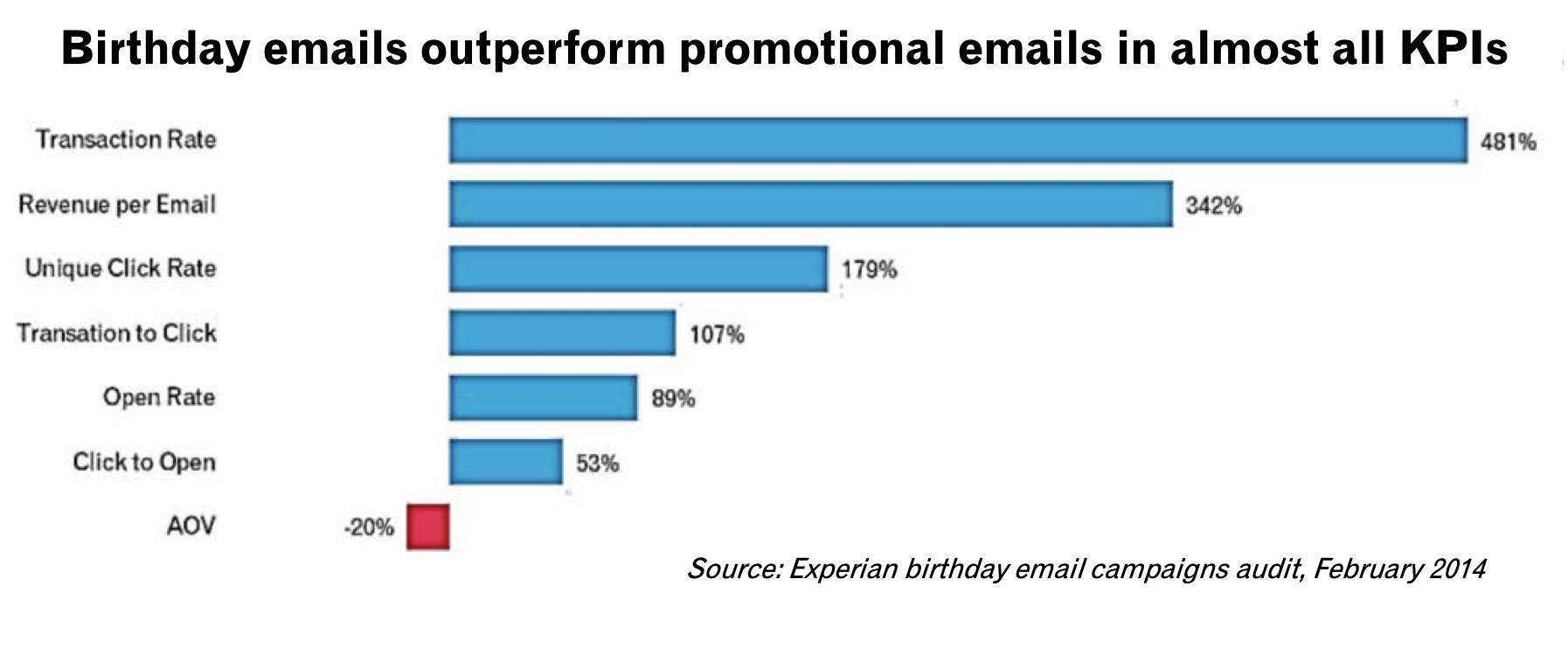
Birthdays, anniversaries, insurance renewals, these type of emails just sit there in the background and trigger daily depending on when someone matches the criteria. This is a simple but effective way of increasing your brand loyalty and triggering clicks back to your site. In their birthday email, Audit Experian said birthday emails out perform promotional emails in nearly all KPIs

Birthday email campaigns audit
Experian Birthday Emails Campaign Audit KPI’s

Cross Sell:

Not only should you cross sell in your order confirmation emails but also dispatch notifications, delivery confirmation and in truth, any other order point of contact. Forrester Research found a 10% increase in AOV on purchases where a recommendation was clicked on.

I am just scratching the surface of what’s possible with automation, essentially, if you can whiteboard the process we can implement an automation program that will sit in the background and increase your revenues from email.

Loyalty and Incentive programs:

This is just an extension of the Nectar, Clubcard, MyWaitrose (other loyalty cards are available) card you have in your wallet but in an online format. Richer Sounds do this very well at point of sign up. You’re encouraged to be a VIP and you’re told what you’ll get by becoming one. It helps with both list growth and list retention.

Targeted communications:

Your email platform will almost certainly have the functionality to segment based on any data held within your database. You can then send targeted communications to people based on the products they’ve previously bought, those they’ve browsed, those that compliment previously purchased products, the list is almost endless. You can do many different targeted emails or if you can code using the dynamic tags, or outsource that bit to an agency like us, you can build one email that dynamically inserts the relevant targeted element based on the data. It is also possible to use some of the personalisation tools out there to scrape in particular offers from your website in real time and drop them into the dynamic personalised section of the email.

The takeaway

The possibilities and the opportunities afforded to you by utilising the tools available and the skills of a professional email marketing company can have a material effect on your bottom line. It is no coincidence that the companies who have fared better in the current pandemic are the ones whose online presence and email marketing programs are constantly pushing the boundaries, whereas the ones that have struggled were slower to embrace the opportunities afforded them by the technologies available.

Email personalisation

Do you even know me? Watch out for these email personalisation pitfalls

It’s ready. Your beautifully designed, flawlessly coded email is one click away from being fired off to thousands of customers.

There’s just one problem: everyone is about to receive the same message. No, the forename which has been shoehorned into the subject line doesn’t count. It’s spray-and-pray dressed up as one-to-one.

Email marketing deserves to be more sophisticated than that. And it can be. We live in an age of dynamic content, data science and machine learning. To the benefit of customer and business alike, it’s possible to send expertly tailored content based on a person’s purchasing and browsing activities.

But even a richly personalised email programme can sometimes trip up. Read on for a list of personalisation perils – and what to do about them.

First name faux pas

The most basic form of personalisation – addressing someone by name – is laden with a surprising number of potential blunders. A marketing email isn’t a casual message between friends, so it’s important to avoid these embarrassing errors.

First of all, there’s the prospect of getting the name wrong. Let’s say Christopher was in a hurry when he signed up to your newsletter, so he entered his first initial rather than forename. Pierre happened to have caps lock active while submitting the form. And Helen accidentally typed her title into the wrong box. Regardless of who is to blame, it’s not going to look good when you greet them with an enthusiastic "Hello C!", "Hello PIERRE!" or "Hello Mrs!".

Then there’s sentence structure. The injection of a first name will often call for additional punctuation in order to be gramatically correctly. An absent comma can completely transform the meaning of a phrase. I once received an email which promised: "This weekend only: enjoy 25% off Adrian!". 25% off me? I’m not even sure what that means but I’m pretty sure I’m not going to enjoy it.

Next up is first name overload. I sometimes receive emails – particularly those which are part of welcome programmes – which are peppered with my first name. It’s in the subject line, the headline and a couple of times in the message body for good measure. Such overuse comes across as forced and artificial – and it’s no substitute for genuinely customised content.

WHAT TO DO INSTEAD:
Address the customer by name once and put some controls in place to make sure it’s validated and presented appropriately.

By means of SQL processing or dynamic rules in your ESP, you can filter out invalid values such as initials and titles. Likewise, you can add or remove commas to ensure that a sentence reads correctly with or without a first name. You can even convert names to title case using CSS. Pierre will be grateful that you’ve stopped yelling at him.

Meaningless exclusivity

I’ve lost count* of how many times I’ve been presented with the subject line "Exclusive offer for you, Adrian!" or some variant thereof. For example, one time I was offered a free greetings card – just for me – by an online gifts retailer. That could only mean one of two things:

A: They thought of me as a really special customer
B: It wasn’t really just for me

Considering that I hadn’t bought anything from this particular company since my first purchase over half a year prior, I suspect that I wasn’t their star customer. That only leaves option B. The offer had been introduced with a lie. Not a good start if they were hoping to build rapport.

Ok, so calling it a lie is a touch melodramatic. It’s a throwaway attention-grabber akin to advertising puffery. But taken literally, it’s untruthful. Whether that’s enough to deter someone from opening the email depends on the individual. Some won’t notice, some won’t care. But on some level, consciously or not, customers might realise that the brand isn’t being entirely honest with them.

(* I wasn’t really keeping count. I have better things to do, such as writing articles complaining about it.)

WHAT TO DO INSTEAD:
Be honest. If an offer is open to everyone and their mother, drop the empty claims of exclusivity in favour of the offer details. "Adrian, get a free card when you spend £15" works for me.

Of course, if you’re running a promotion which is only open to a particular group – your Gold tier customers or top reviewers perhaps – then that is absolutely worth shouting about.

The illusion of personalisation

I recently conducted an experiment. By opting in to a multi-channel retailer’s mailing list and taking care not to venture beyond the homepage, I wanted to discover what sort of offers I’d be sent.

Some non-personalised marketing emails landed in my inbox over the weeks which followed. These included promotions which were broad in scope and liable to appeal to a general audience. That made sense.

After a while, ostensibly tailored offers started to creep in. These were presented as ‘Deals for You’ and pushed very specific products. Their proposed SIM card for an obscure model of mobile phone was a real stab in the dark and I can safely say that I’d never even thought about organic air fresheners for cars before. But there they were, served up as items of relevance to me.

The moral of the story: if an email isn’t personalised, don’t pretend that it is.

WHAT TO DO INSTEAD:
Only use phrases which suggest hand-picked products if you genuinely possess enough data to build a customer profile. Split your lists or use dynamic headlines to switch the copy to something more apt for people with no browsing or buying history. Phrases such as "popular with other customers" and "trending now" make great headlines for dynamic content and encourage your customer to explore.

Algorithm blues

I’d like to share an anecdote about an email personalisation calamity. Yes, I am a riot at parties.

A colleague of mine once ordered several items of classic literature which were required reading for her daughter’s university studies. A few days later, she received an email with some personalised recommendations. Unfortunately these suggestions happened to be precisely the same works of literature albeit from different publishers. Oops. She didn’t take them up on their offer.

The company in question usually does a world-class job when it comes to personalisation so this incident is an unfortunate hiccup. Nonetheless, it serves to illustrate the dangers of assuming that your AI-generated content always hits the mark.

WHAT TO DO INSTEAD:
Test it. Set up dummy accounts and put through dummy orders. If nonsensical recommendations crop up then it’s time to adjust the settings.

Better still, why not consult members of staff who you know to also be customers? You can’t get a much more authentic picture than that.

A/B tests are your friend here too. Measuring personalised versus non-personalised or different personalisation rules against each other will yield significant insight into customer engagement.

Yesterday’s news

Common sense dictates that you would only send a sale email while the offer is still running or a final few email while there is stock remaining. But what happens if someone opens the email a little too late and unwittingly clicks through to your website only to discover the bad news? Disappointment – that’s what happens. That’s a risk inherent to static emails since you have no control over them once they’re out the door.

Let’s consider another scenario. You’re issuing single-use discount vouchers to your VIP customers. To encourage as many conversions as possible, you’ll also be sending a reminder and last chance message. But to whom are you sending these follow-up emails? Crying "don’t miss out!" at a person who has already redeemed the voucher could leave them feeling undervalued as a customer. Nobody wants to feel like just a number.

WHAT TO DO INSTEAD:
Dynamically-rendered images to the rescue. By generating an image at the moment of open, your email automatically stays bang up-to-date – even after it has landed in your customer’s inbox.

Sale finished? Strike through the headline and drop in an alternative message encouraging people to check out your other great offers. Using a service like Movable Ink or Fresh Relevance, you can even monitor the stock of individual products and update your mailing post-send.

As for who you’re sending emails to – that’s where effective tracking and segmentation comes into play. Check your mailing reports and exclude customers who have already taken you up on an offer. Fantastic – now you’re no longer pestering your most loyal customers.

Forgetting that the customer is always right (about the customer)

Do you know who is the leading expert on me? It’s me.

Retailer X may have collated and harnessed lots of data regarding my activities as a consumer but their subsequent product recommendations are still essentially an educated guess.

We don’t always know why someone looked up a particular item. There’s room for misinterpretation. Let me share an example from personal experience.

I am not a fan of comic book movies. But I am a fan of my home town’s successes. That’s why, when The Avengers was being filmed in Edinburgh, I kept an eye on media coverage of the proceedings.

Ever since, cinematic superhero-related articles have been cropping up in my newsfeed. To the data mechanisms behind the scenes, this is a logical conclusion. To me, it’s an irrelevance to be ignored.

WHAT TO DO INSTEAD:
Use a preference center. An old-school tick-the-box form may lack the futuristic glamour of AI but it remains a crucial tool in the email marketer’s belt. What better way to send the right content to the right people than by letting them choose? Combine that with machine learning and you have the recipe for truly personalised emails.

Ignoring the age of AI

Artificial intelligence – whether or not the technology deserves such a grand title – is here to stay. Machine learning gives us the power to track customer interests and predict their behaviour. Today that means content such as product recommendations, which are great of course, but soon it could mean entire emails designed from the ground up for individual customers. AI already has a significant role in email marketing, and that will only continue to grow. Be ready!

Conclusion

Any email marketing programme worth its salt must incorporate some level of personalisation. Customers expect relevant content. And they expect it to be correct.

This isn’t just hearsay – the statistics back it up. Picking some figures from Segment’s 2017 State of Personalization Report, we can see that 37% of customers will be deterred from buying something and as many as 23% will unsubscribe if a brand gets information wrong when sending them direct marketing. That’s nearly a quarter of your mailing list who are prepared to up-and-leave if your data isn’t spot on.

Get it right however and you’ll be basking in the flipside of those stats. A third of consumers will feel inclined to give you a positive review following a personalised shopping experience. 44% are likely to come back for more. And half of the shoppers out there have made an unplanned purchase on the strength of a relevant product recommendation.

It’s fair to say that good quality email personalisation is complex, both strategically and technically. But you’re not in it alone. There are tools and services to help with every aspect, including specialist areas such as browse abandonment or product review invitations.

Once of all the personalisation pieces are in place, your emails will leave customers with a comforting thought: "they really do know me".


Email Marketing

How to master lifecycle marketing with email customer journeys

Lifecycle marketing is a term that describes the process of engaging with your customers throughout their relationship with your brand, from awareness to loyalty. It is a way of delivering the right message to the right person at the right time, based on their stage in the customer journey. But how do you achieve this level of relevance and personalization with email marketing? How do you know what your customers want and need at each point of a lifecycle lasting 2 or more years? How do you create email campaigns that adapt to their changing behavior and preferences?

The answer is simple: you need to think of lifecycle marketing as an aggregation of individual email customer journeys.

What are email customer journeys?

Email customer journeys are the sequences of emails that you send to your subscribers based on their actions and interactions with your brand. They are designed to guide them towards a specific goal or outcome. For example: making a purchase, renewing a subscription, or becoming an advocate.

Email customer journeys can be triggered by various events. Examples include signing up for your newsletter, browsing your website, abandoning a cart, completing a purchase, celebrating a birthday, etc. They can also be based on different criteria, such as demographics, interests, preferences, behavior, etc.

The key to creating effective email customer journeys is to map out the different paths that your audience can take. You can then design email campaigns that cater to each one. For example, you can send a welcome email to new subscribers, a reminder email to abandoned cart users, a thank you email to recent buyers, a replenishment email to repeat customers, a birthday email to loyal fans, etc.

By adding all these individual journeys, you can create a rounded and consistent experience that nurtures your audience throughout their lifecycle. You can also optimise your email performance by delivering relevant and personalised messages at the right time that increase engagement and conversions.

The challenge of complex journeys and the role of expertise

While many email marketing platforms provide templates for simple customer journeys, more complex journeys often require specialised expertise. This is where we can help.

Complex email customer journeys may involve advanced segmentation, triggered emails, dynamic content, and sophisticated optimisation techniques. Our customer journey expertise can assist in building out these complex journeys, leverage our knowledge and experience to ensure success.

Benefits of email customer journeys

Implementing email customer journeys, whether simple or complex, offers numerous benefits for your marketing efforts:

  1. Increased relevance and personalisation: sending emails that align with customers’ needs and preferences at each stage of their lifecycle enhances their satisfaction and loyalty.
  2. Improved engagement and conversions: motivating customers to take action through targeted emails at each stage boosts their involvement and drives revenue.
  3. Reduced churn and attrition: retaining customers’ interest and trust throughout the lifecycle decreases the likelihood of them leaving or unsubscribing.
  4. Enhanced brand awareness and reputation: showcasing your brand’s value proposition and personality in emails reinforces awareness and advocacy among customers.

Conclusion

Lifecycle marketing requires an understanding of your customers’ behavior and preferences at each stage of their relationship with your brand. By creating email customer journeys that cater to individual needs and preferences, you can provide a cohesive and personalised experience.

While many platforms offer simple journey templates, more complex journeys may necessitate specialised expertise. Collaborating with an agency like The Email Factory can provide the necessary skills short-term.

Artificial intelligence

Up your marketing game with generative AI!

Artificial Intelligence (AI) has long been a topic of discussion, with most debates focussing on its potential to surpass human capabilities. However, it is crucial to shift the focus from comparing AI to human excellence towards understanding how AI can enhance individual skills and abilities. So I was pleased to read a recent interview with Neil Tennant of the Pet Shop Boys. He highlighted the value of AI as a tool to assist and improve creative processes – even for him!

Neil Tennant’s viewpoint aligns with the idea that AI can be a valuable resource even for established musicians and artists. He cites the example of a song, "Forest Floor," which the Pet Shop Boys never finished. Tennant suggests that if AI had been available at the time, he would have used it to generate multiple versions of the chorus, potentially uncovering an unexpected gem. This demonstrates how generative AI can act as a creative catalyst and assist artists/experts in overcoming writer’s block or exploring new avenues.

The real question: does AI make me better?

Often, discussions surrounding AI revolve around its ability to outperform humans in specific fields. However, the true value of AI lies in its capacity to amplify individual potential. When we reframe the question to focus on what AI can do for us, the possibilities become apparent. This mindset shift opens up new opportunities for marketers, designers, and generalists who may lack specialized expertise in certain areas. By leveraging AI, individuals and organizations can level up their skills and accomplish tasks that were once time‑consuming or costly to outsource.

AI as a levelling-up opportunity

The potential of AI to level up individuals in various fields is evident, especially for jobs requiring multiple skills – marketing being a prime example. If you are a marketer who also has responsibility for email, or an email marketer who lacks specialized expertise in an aspect of the role or have limited resources at your disposal, leveraging generative AI to enhance their skills, produce quality content, and maximize their productivity.

AI in copywriting

Copywriting plays a vital role in marketing, and AI‑powered generative models have proven to be valuable aids in this domain. While there are skilled copywriters who excel without AI, many marketers can benefit from using AI to generate and refine copy. By providing a straightforward brief to AI language models like ChatGPT, marketers can swiftly create subject lines, short‑form copy, bullet points, and newsletters, all while maintaining control over the desired tone. This collaborative approach allows individuals to become better email marketers and enhances their overall productivity.

SubjectLinePRO for instance, is a valuable tool I use that harnesses the power of ChatGPT to assist in writing and then testing compelling subject lines. Several other AI‑powered solutions are available in the market, offering similar benefits. These tools empower marketers with limited copywriting skills to craft engaging content more efficiently and effectively.

AI in image creation

The process of sourcing images for articles or marketing materials can be time‑consuming and expensive. AI‑powered image creation tools, such as Bing Image Creator, have revolutionized this aspect of content creation. Marketers can now generate their own images based on their envisioned concepts, saving time and eliminating the need to rely on external designers. Although having a skilled designer will still result in superior outcomes, AI empowers individuals – like me, who lack that luxury to produce higher‑quality visuals that effectively convey their ideas.

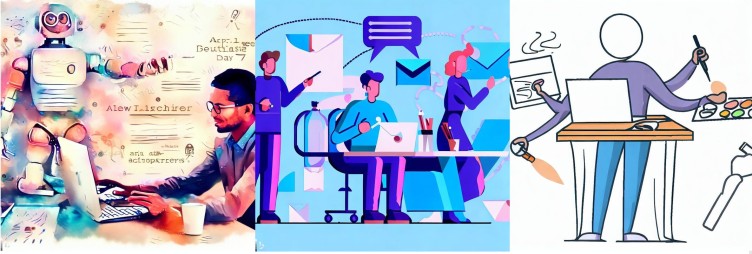
Three email-themed illustrations in different styles, generated by AI.
Images created by Dela Quist using Bing Image Creator

AI in email coding & deployment

While generative AI is a powerful ally, certain aspects of marketing particularly email, still require caution. Challenges related to email deliverability, rendering and accessibility across various email clients necessitate expertise or collaboration with coding specialists. Agencies like The Email Factory (who I recently joined as a NED) specialise in optimizing email design and build to ensure rendering consistency and compliance with industry standards. In terms of email deployment, segment creation etc. I am yet to see a tool that performs those functions.

By recognizing the areas where AI is yet to reach its full potential, marketers can make informed decisions about when to insist on expertise.

Conclusion

Generative AI’s role in the creative process is not to replace human expertise but to augment and empower individuals in their respective fields. By adopting a mindset that focuses on AI’s capacity to enhance personal abilities, rather than comparing it to the best human talents, we open ourselves up to a world of opportunities. Neil Tennant’s perspective, along with real‑life experiences, supports the argument that AI is a tool for levelling up and improving individual skills. Marketers in general, Email Marketers in particular, can benefit from AI‑powered solutions for copywriting and image creation, enabling them to excel in their roles without extensive specialization. Embracing AI as an enabler rather than a competitor will ultimately lead to personal growth and professional advancement in the evolving landscape of marketing.

This article and associated images were produced by me using #chatgpt ChatGPT and #Bing Image Creator.

Email Marketing

Set the tone

I last wrote about the importance of tone of voice in emails in 2015. While much has changed (in part due to the rise of social apps like Tik Tok and Instagram and more recently generative content AI), many businesses are still creating marketing collateral that comes across as stilted and impersonal when it comes to email.

Whether the excuse is ‘we’ve always done it this way’, fear of brand perception or just plain lack of imagination, adopting a corporate approach no longer fits with how we behave online.

Certain business sectors allow for more flexibility than others but there is scope to increase the appeal of your email messages with colloquial writing.

TV advertising has been doing this for decades because you can see and hear people in situations where anything other than relatable interaction seems out of place (although there are unnatural situations – those cringe-worthy life cover or funeral plan ads for example).

TV ads actually lean toward extremes to create dynamism so human interaction and everyday language is pronounced and quick-fire to make the most of the short message time.

The ways we interact online now is much the same as if we were there in person – screen communication is second nature, especially to Gen X, Z and Alpha.

And now there is a new player in town for writing, creativity and ideas in general; the rise of the robots!

The easy life?

Yes, the likes of ChatGPT can save time and generate copy in the style of a range of writing styles by accessing past works but it’s not original, nor will it work for a brand wanting to express individuality or stand out from the crowd.

I have spoken with time-poor marketers who find it difficult to avoid generative AI, but promising at the least to rework content output to fit their brand, products, current offers and timings.

But even using AI as a start point means the initial creative process suffers and whilst emails shouldn’t be novels, they should have original content, an individualistic approach and be created by people immersed in their brand with mind-mapping capabilities. It’s no bad thing to have a human flaw or two in the mix either.

The alternative is the emails we receive becoming increasingly similar and there are enough of those out there as it is.

AI for email has been around for a while and is one of the tools many ESP software platforms incorporate so digital marketers aren’t afraid of it – but perhaps we should be this time. The pace and global adoption of AI for creative use should be a concern for all of us.

Don’t get lost in the noise

Creating copy for emails is about more than brand voice. We need to differentiate ourselves from our competitors and peers to stand out.

Many marketing emails – particularly in the B2B space – have a generic tone and display stock images in a linear layout in the hope people will read on and click on something. Adopting a conversational approach doesn’t have to be boring or misrepresent your brand.

By sticking to the script – be it generalising or by using output from generative AI – we risk coming across as robotic and detached which means our message becomes less appealing, leading to diminished engagement.

Attention spans are short online and fragmented across multiple channels and devices so it’s critical to engage people as quickly as possible with a friendly and distinctive approach.

The ever-increasing hours we spend with our devices is driving change in communication styles, making a less conversational approach to marketing feel outdated.

Grab me now

Two key areas in marketing emails are the initial headline – which should draw people into the rest of the email – and your call-to-action. Your headline should be succinct and pique interest, maybe using a question or humour as long as it is consistent with the theme and content.

The call-to-action should be different to what we all see too often. ‘Buy now’, ‘Read more’, ‘Don’t miss out’, ‘Find out more’ are better than ‘Click here’ but they’re all overused and easily passed over.

Instead, come up with copy unique to your brand and email theme. There are more words to play with in text links but you can have fun with button text too.

And it’s not just the tone of voice in an email – the design, layout, images and call-to-action placement all need to be connected and coherent. Emails should work well on mobile devices and be able to appeal in multiple physical settings.

By the book

If you don’t already have one, create a ‘copywriting brand bible’ with customer types, tone of voice, language and style –  including words that encapsulate your brand identity (and ones that don’t). Follow brands that have a tone of voice and identity you like, as well as ones that don’t.

Join the dots

Ensure the brand message remains consistent so as not to confuse or disenfranche customers. All emails – newsletters, sales, order confirmations, delivery notifications, follow-ups etc. should tie in. Make the customer journey as memorable and joined up as possible.

Look at me

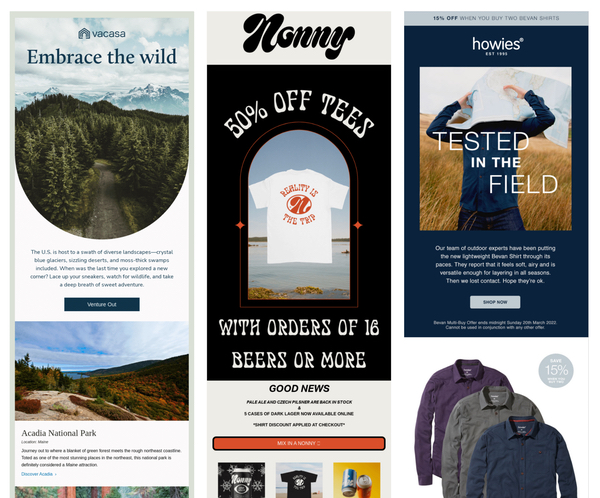
Vacassa, Nonny and Howies all send emails that are visually striking and easy to read:

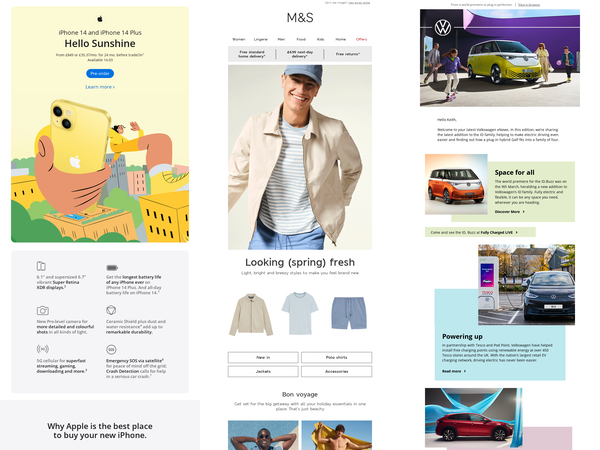
And you don’t have to be a small or ‘funky’ brand to look good – Apple, M&S and VW use clean images combined with bold colours and good use of space in these examples.

It’s only natural

Marketing should reflect how integral the online world is in our daily lives. Allied to effective segmentation, targeted content and unique language, people will feel more comfortable and trusting when interacting with brands – not just see them as faceless entities mirroring each other in our inboxes in the hope of making a quick buck.

Change can be a scary prospect for some brands and marketers but the beauty of email is that it is quick, easy and cost effective to test. Sending to small data segments to gauge how well messages are received and how well they perform will give marketers the knowledge to get closer to customers and that’s a win for both sides.

The likelihood of any of us being offended by a brand being more approachable is remote, in fact we prefer it. We’re all human and we’re all unique, so why communicate with us as if we’re not?

Email Marketing

Email marketing as a tool for strategic persuasion

Basket abandonment emails sell!

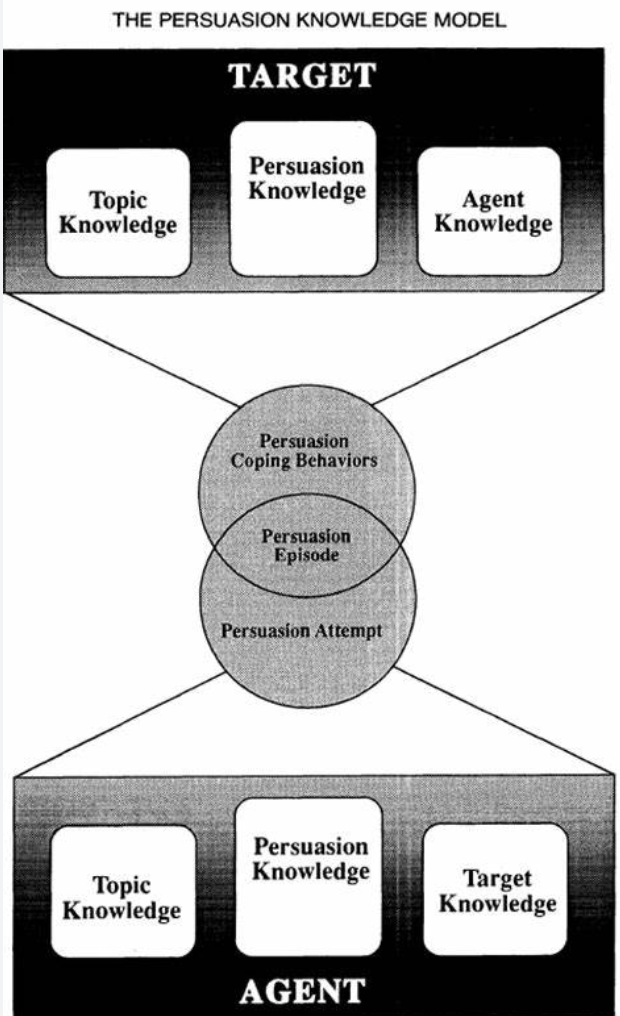
The Journal of Interactive Marketing published an article on the effect of basket abandonment emails and how they correlate to customers going to purchase the items. They found that insights from the persuasion knowledge model (Friestad and Wright 1994) and using an advertisement wear-out method can be used as an explanation for why basket abandonment emails are such a persuasive and successful way of marketing items that customers have had an interest in. However, other things also affect the likelihood of customers purchasing due to basket abandonment emails. These include but are not limited to the time of day the email is sent, how soon after the abandonment and the time of the month sent.

In 2021 there was expected to be 19.5% of the total worldwide retail sales were performed online. The increase in the e-tail industry has resulted in a greater need for email marketing, which has come to be a staple in generating sales leads. Over 69% of all businesses use email marketing as a daily tool.

Persuasion knowledge

Persuasion knowledge is an important tactic when it comes to email marketing. With the aim to influence a customer’s actions, and drive awareness to the product. This is why companies use dynamic content to deliver products the customer has been looking at. However, this can come across as the company trying to persuade the customer into buying the product which in some cases can be detrimental. It has been found that when the message is more subtle in a Customer Relationship Management email (CRM) the customer is more likely to trust the company and is therefore more likely to purchase the product. As the email hasn’t been sent with the obvious message to buy that product. From this, it has been determined that emails with discounts for the product or just in general provide good persuasive knowledge and increase the sales of said product.

Therefore, an explicit sales intent email is likely to achieve less success than an email that has the sales message interwoven into it. Similarly, it has been found that emails with a low level of persuasive knowledge may work at the start. However as time goes on these emails become less effective, whereas those with a high level of persuasive knowledge have a non-monotonic effectiveness.

Performance response

With that being said, the readers that opt in to specific content respond better to that specific content than those not opted in. However, once the content strays from what they opted into there is no difference in those who either opted in or out of that content.

Although basket abandonment is a beneficial way to drive sales of the product, to be able to send these emails the company has to go through extra tracking and identifying measures to be able to perform this. This has been shown to evoke a somewhat negative reaction from some customers as they question their privacy. So even though a customer has the product in their basket shows a high level of interest, a basket abandonment email could still have a negative effect and cause them not to purchase the product. For basket abandonment emails it has been found that a more explicit and direct message is the most likely way to convert into a sale.

CRM emails or basket abandonment or both?

This is a contradictory finding between CRM emails and basket abandonment emails. Whilst CRM emails are shown to provide an increase in the spending amount of a customer, converting the customer’s shopping cart into an email has been shown to allow for more effective results in the long term when combining both and using them as a dual email strategy. This allows for the CRM emails not to be as frequent. The frequency of the CRM emails can affect a customer’s intention to buy as a higher frequency has been seen to get annoying and put customers off.

Looking at opt-in messages that vary from what the customer has specifically opted in for have been found to have varying results. Those who opt in are shown to have a more amenable attitude towards ongoing communication with the company. However when the emails stray too far from what they originally opted in to the click-through rate drops. It has also been found that the spending amount for customers that opt-in and receive CRM emails are higher than for those who do not receive these emails.

Targeted CRM emails

The spending amount increases even more when the CRM emails have a relation to the specific area the customer opted into.  Adding promotional emails into the mix, to serve as a reminder to the customer rather than a tool used for price reduction has been shown to have a beneficial effect on reducing basket abandonment and increasing sales.

Overall, it has been found that the use of email marketing as a tool for strategic persuasion is very beneficial and if it is done right can produce great results. However, if not done properly the effect it can have can be detrimental in the fact of converting sales and lowering the click-through rate.

Email Marketing

Why I am joining The Email Factory

In the current economic climate, it’s important for brands to focus on keeping
existing customers engaged. The cost of acquisition is high because the return
on ad spend is low. As a result, many companies are paying more attention to
email marketing and asking a lot of their existing in-house resources. However,
this has created a catch-22 situation where businesses need more automation to
deliver this, but they’re too busy to implement anything new.

This is where The Email Factory comes in. As an agency specifically designed to
work with companies that do email marketing in-house, The Email Factory can
help businesses make the improvements they need to their email campaigns.
From redesigning triggers to automating templates and improving deliverability,
The Email Factory can help businesses be more productive and engaging with
their email marketing.

When Mike Parry, founder of The Email Factory, reached out to me about his new
venture, I was excited to join as a non-executive director. The agency’s approach
fills a real need in the market, and I believe it’s what businesses need at this
moment in time. The Email Factory is based in the UK, giving businesses the
opportunity to work with people who are familiar with UK best practices and
brands at a competitive price point.

There are companies that offer similar services, but many of them are offshore.
The Email Factory is different. It’s an agency that provides tailored services to
businesses that want to improve their email marketing capabilities. As a non-
executive director, I look forward to helping The Email Factory grow and bring
much-needed support to businesses that want to improve their email marketing.

Email coding

Was Outlook right about email all along?

Ask any email marketer what their biggest bugbear is, and there’s a strong chance that they will answer Microsoft Outlook. The desktop Windows application is notoriously uncooperative with modern coding standards. It’s a place of archaic development techniques, myriad quirks and unpredictable rendering glitches. That sometimes leads to protracted development times and hair-pulling levels of frustration.

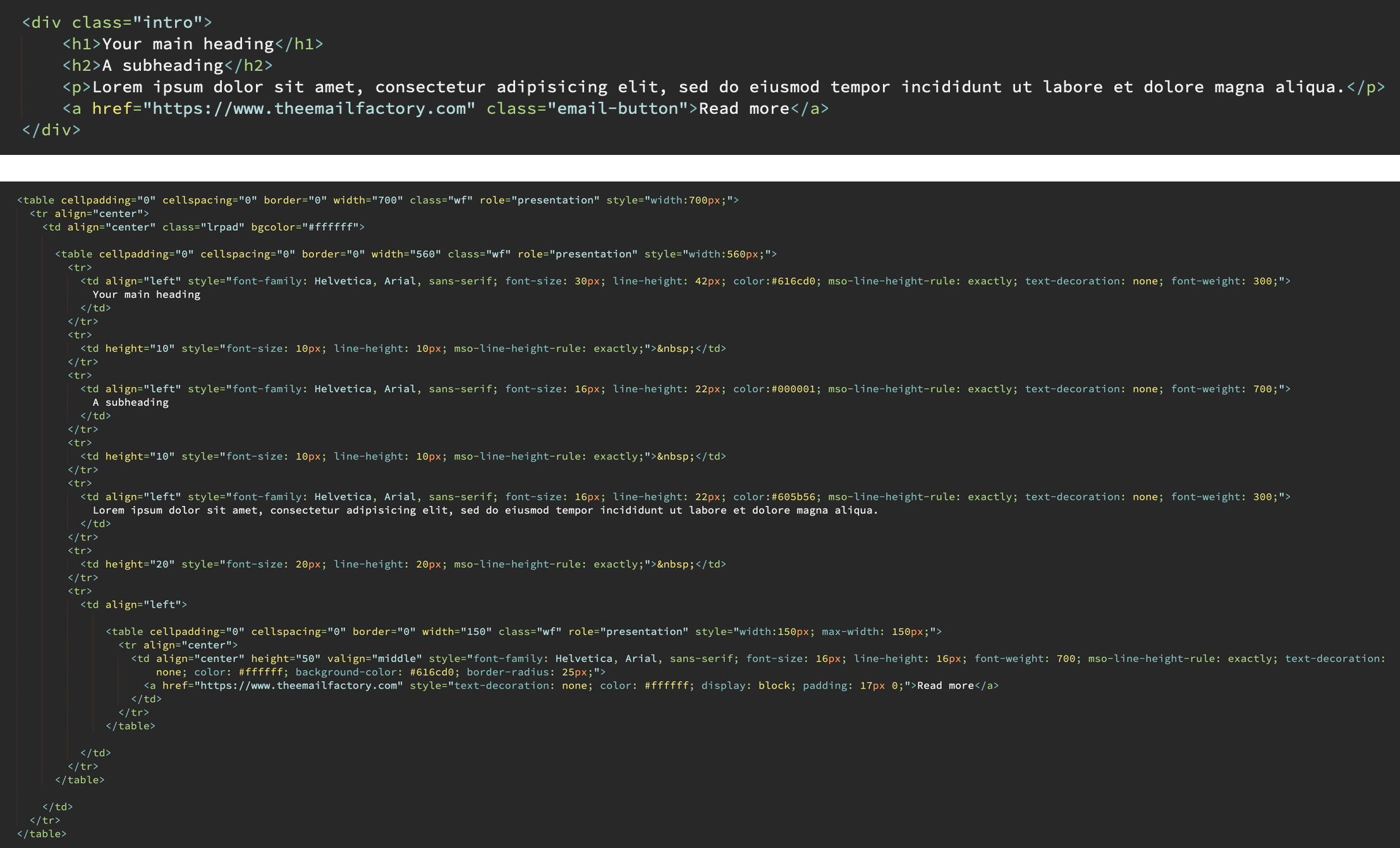
Here’s a comparison of clean web-style code versus Outlook-targeted bloat:

Comparison of web-style and Outlook coding

But I don’t think Outlook is entirely to blame. Here’s why.

Outlook is not alone

Modern web browsers, for the most part, agree on how HTML and CSS code should be interpreted. The same cannot be said for email services. The various pieces of desktop software, webmail sites and mobile applications all behave differently. Each email platform, from Gmail to Samsung to Yahoo, has its own strengths and weaknesses. The only significant exception is the ever-reliable Apple Mail. This uneven landscape is the reason for email-coding being a profession of tricks and workarounds.

While Outlook is inarguably the least code-friendly of all major email applications, it’s not alone in its patchy support for modern web-coding standards.

I’m here for the offer

I don’t open a marketing email to see brand fonts or fancy design or flashy GIFs. I open it because I think there’s something of value to me in there. That might be a special offer, or a new product that matches my interests.

And I want to absorb the information in the quickest time possible. A marketing email is rarely a thing to be perused. If I crave visual stimulation, I will look at art. If I’m in the mood for reading, I open a book.

When I open a marketing email, seeking that tempting discount, a plain-looking design or a graphical defect is not going to be a deal-breaker. It’s an irrelevance.

Email is email, the web is the web

I missed an if earlier: if I want to browse the internet, I’ll browse the internet. Email – electronic mail – used to be the digital equivalent of a posted letter. But at some point it became standard practice for marketing emails to resemble mini websites. Navigation bars, complex layouts, rich graphics, fully-blown footers. Even interactive components such as drop-down menus have become fairly commonplace.

To achieve such an email requires layers upon layers of non-standard coding techniques. To a front end web developer who is used to coding efficiently, it’s likely to look like an incomprehensible mess at first glance. I picture it as a ramshackle machine, bodged with duct tape and liable to break down at any moment. And what is all this effort for? To force a medium to do something that it was never intended to do!

Word games

Microsoft made an industry-changing decision when they released Outlook 2007. Emails would be displayed using the Word rendering engine. Yes, that’s Microsoft Word as in the word processor. And, at the time of writing, it has remained this way for all subsequent Windows editions of Outlook.

Not only does this explain the platform’s extremely limited support for modern web code, but it’s also the reason for sporadic rendering glitches. Marketing emails are often fractured by pixel-thin lines appearing as if at random. One common cause of this is content falling on Word’s unseen page breaks behind the scenes.

Example of rogue white line in Outlook email

But is this truly a flaw in Outlook, or a problem created through misuse of the medium?

Things change: part I

From time to time, email vendors update their platforms and significantly change how they interpret HTML and CSS code. Sometimes that means improvements, sometimes it means email-breaking regressions.

Here’s a good example. More than once, I’ve seen the code used to stack content on mobile suddenly stop working. The solution: yet more unorthodox coding techniques.

This is part of the reason why companies (should) regularly check their mailings on as many email services and devices as possible. An email may display perfectly today, but tomorrow could be a different story. Even the most robust HTML email template is ultimately fragile. Keeping things simple is an effective future-proofing technique.

My needs are simple

From a consumer’s perspective, Outlook is perfectly capable of everything I need a marketing email to do. Formatted text allows me to scan over an email and pick out key points such as product name and price. High resolution images show me what a product looks like. Large, clear buttons give me a means to move onto the next step – in a web environment – should I choose to.

But what about pixel-perfect design, drop shadows, cool GIFs, web fonts, animation, and other bells and whistles? I don’t need those. Such non-content is of immeasurably more concern to a marketing department than it is to a customer.

Things change: part II

And now it’s time to unravel everything I wrote above. Technology progresses, trends move on, and I don’t want to be a closed-minded Luddite.

When I claim that Outlook does all I need it to, I’m seeing things through a conventional lens. In actual fact there are several pieces of enhanced functionality that would benefit me as a customer. It would be handy to watch a movie trailer, or to listen to a snippet of an album, or check out a t-shirt in different colours… all without leaving the mailing. Just because email has traditionally been a gateway to a website doesn’t mean it must always be that way.

So, is outlook right?

I’ll pick a side – no. There are definitely lessons to be learned from Outlook’s approach to email, and it reinforces the importance of substance over style. But ultimately its resistance to modern web standards is resistance to progress in general, and holding the medium back. And if Microsoft was truly making a stand about what email should be, why equip Outlook with a diluted level of HTML and CSS capabilities rather than none at all?

Google’s AMP for Email is a determined move to transform email into a rich, fully interactive experience. The technology may not have taken off in dramatic fashion, but adoption rates are slowly growing. In any case, it would be absurd for the world of email to maintain its antiquated coding techniques forever.

There’s also a new version of Outlook on the horizon. Anticipated for late 2026, there are convincing rumours that it will at last support modern development techniques. That changes everything.

When that day comes, we’ll be given the gift of time. Instead of wrestling with rendering problems, let’s focus our efforts instead on customer-focused content and design.